If you’ve tried AI video, you’ve probably hit the other wall: video AI prompting.
You type something that sounds obvious, and the result comes back slightly off. The wrong thing moves. The motion is too much. Text loses clarity. The scene drifts. Then you end up tweaking words without getting closer.
That is not you. That is just how video models work. They need you to be specific about two things: what should move and what must stay locked.
If you are animating a finished design or mockup, you already start with a big advantage. The subject, the scene, and the style are already there.
So your prompt can stay short:
- Camera plan
- Action
- Style & ambiance
- Sound (optional)
Example:
Camera: locked-off camera, perfectly static, no zoom
Action:
[0-2 s] — Headline letters slide into place with a minimal bounce
[2-6 s] — Hold perfectly still, no additional motion
Context: keep kerning and alignment consistent, no warping, no drifting
SFX: soft thump on settle
Audio: short percussive beat, minimal
If you want more aesthetic words to plug into your prompt, use Kittl’s AI design prompt guide as a vocabulary bank for lighting, composition, setting, and style keywords you can copy and remix.
1. Camera video AI prompts
The camera plan is the AI video prompt that tells Kittl Video how the viewer should see the design. You only need three things: framing, camera movement, and focus.
| Use a locked camera when you have | Use subtle camera motion when |
|---|---|
| Important typography | The subject is more product than layout |
| Tight alignment and grid layout | The clip should feel like a filmed shot |
| Logos, labels, or UI that must not move | The text is minimal, large, or not the main focus |
A. Common camera moves that preserve readability
Camera moves that keep text, logos, and alignment readable. Use these for posters, ads, and mockups where the design must not move.
| Camera movement type | What it looks like | Best for | Prompt words to use |
|---|---|---|---|
| Locked-off camera | Completely still, tripod-stable | Typography, posters, layouts, logos, packaging text | “Camera: perfectly static, tripod stable, no camera movement, no zoom, no pan, no tilt, same framing from first frame to last“ |
| Subtle handheld | Tiny natural human sway | Lifestyle mockups, documentary feel, casual scenes | “Camera movement: subtle handheld, minimal shake, no zoom, no intentional pan or tilt, gentle organic micro shifts” |
| Slow push-in | Camera glides forward closer to subject | Product hero shots, mockups, premium reveals | “Camera movement: slow smooth dolly-in toward subject, straight forward, subject centered, no drift, no orbit, no zoom” |
| Gentle zoom in | Camera stays still, image magnifies evenly | Simple hero moments, minimal scenes | “Camera movement: gentle constant zoom-in, camera fixed, no dolly, no pan, no tilt, uniform lens zoom” |
| Slow pull-back | Camera glides backward to reveal more | Reveals, showing context, establishing space | “Camera movement: slow pull-back, straight backward, constant speed, no zoom, no pan, no tilt, reveal more surroundings” |
| Gentle zoom out | Camera stays still, frame widens evenly | Showing more layout or environment cleanly | “Camera movement: gentle constant zoom-out, camera fixed, no dolly, no pan, no tilt, framing gets wider over time” |
| Pan | Camera rotates left to right from the same spot | Scanning a scene, wide posters with safe margins | “Camera movement: slow smooth pan left to right, camera fixed position, constant speed, no zoom, no tilt, no roll” |
| Side tracking shot | Camera moves sideways through space | Environments, shelves, lifestyle scenes, product on table | “Camera movement: smooth sideways tracking shot, straight lateral move, constant speed, no zoom, no pan, no tilt, no roll” |
| Follow subject | Camera tracks the subject as they move | People movement, product being carried, walk-by scenes | “Camera movement: smoothly tracks the main subject, keeps subject centered, constant speed, no jitter, no zoom, no tilt, no roll” |
| Tilt | Camera rotates up or down from the same spot | Vertical reveals of posters, buildings, tall objects | “Camera movement: slow tilt up, camera fixed position, constant speed, no pan, no zoom, no roll, clean vertical rotation” |
| Vertical reveal | Camera rises straight up without tilting | Clean upward reveal, architecture, flat graphic scenes | “Camera movement: vertical reveal, camera glides straight upward while staying level, no tilt, no rotation, no zoom, no drift” |
| Moving through the scene | Camera travels forward inside the environment | Walk-throughs, store aisles, immersive brand worlds | “Camera movement: smooth forward journey through the environment, constant speed, no drift, no zoom, no tilt, no roll” |
| POV shot | View feels like the viewer’s eyes | First-person storytelling, hands in frame, immersive scenes | “Camera movement: immersive POV shot, seen through the character’s eyes, camera locked to head position, no third-person angles” |
| First-person movement | Walking-like forward motion with gentle sway | Streets, corridors, handheld realism, POV walking | “Camera movement: first-person perspective walking forward, gentle natural head sway, smooth and continuous, no big shakes, no zoom” |
| Slow orbit | Camera circles around the subject | Hero product moments, fashion spins, cinematic emphasis | “Camera movement: slow 360 orbit around subject, constant speed, subject stays roughly centered, no zoom, no tilt, no roll” |
| Drone-like movement | Floating elevated motion through space | Big brand worlds, outdoor scenes, overhead reveals | “Camera movement: smooth drone-like motion, stable and weightless, no handheld shake, calm cinematic pace, glides through space” |
| Crane shot | Camera rises or lowers through space | Big reveals, emotional lift, scale and closure | “Camera movement: crane shot, camera moves smoothly up or down, steady speed, subtle tilt only to keep subject framed, no zoom” |
| Parallax movement | Foreground slides faster than background | Layered scenes, depth on mockups, cinematic depth | “Camera movement: parallax move, sideways travel, foreground moves faster than background, smooth lateral motion, no zoom, no tilt, no roll” |
A locked camera is the safest choice for finished designs. If you need the camera to be completely still, use the same image as both the start frame and end frame. It helps the model stay locked and makes looping cleaner.
B. Cinema-inspired camera techniques
These are recognizable Kittl Video prompts that create a strong film-inspired, emotional effect. Use them sparingly and keep them slow and controlled for the best results.
| Technique | What it does | When to use | Prompt words to use |
|---|---|---|---|
| Dolly zoom | Subject stays similar size while the background feels like it stretches | Tension, shock, sudden realization | Camera movement: dolly zoom effect, subject centered, background distorts |
| Crane shot | Camera rises or lowers through space | Big reveal, emotional ending, showing scale | Camera movement: crane shot, camera rises smoothly to reveal the scene |
| Symmetrical tracking | Camera moves forward perfectly centered | Stylized scenes, corridors, architecture, controlled mood | Camera movement: slow forward tracking shot, perfectly centered, symmetrical |
| Deep focus | Everything stays sharp front to back | Scenes with multiple points of interest, informative shots | Focus: deep focus, foreground subject and background all sharp |
| Documentary handheld | Natural handheld realism | Human moments, raw lifestyle energy | Camera movement: natural handheld camera, raw and intimate |
| Hero 360 orbit | Camera circles around the main subject | Big hero moment, fashion, dramatic branding | Camera movement: smooth 360-degree dolly orbit around the hero, medium speed, movement smooth and controlled |
After the POV camera line, add an AI video prompt first-person subject action that describes what the character does and where they look. Example: “Turn inside the taxi but keep watching the road” or “Walk closer and shake hands”
2. Action video AI prompt
By definition, action is the specific motion you want to happen. So you can imagine Kittl Video prompts like flicker, glow, hover-tilt, breathe, write-on, wipe reveal, and subtle sway.
Clear actions create controllable motion. And if you want even tighter control, you can write action like a tiny timeline. Veo responds well when you break a clip into short beats, especially for human movement, product handling, or anything that should happen in a specific order.
Use simple time beats like this
- “[0–2s] the person enters frame”
- “[2–3s] the box is placed”
- “[3–6s] everything holds still”
This reduces guesswork because the model is not inventing pacing. It is following your sequence.
Example: “Make the candle flame flicker naturally, with small irregular movement”
Or: Example with time beats: “Action: [0–1s] hold still. [1–6s] the candle flame flickers naturally. End on the same pose for a seamless loop”
If you write two different actions, the output often looks messy. One action per clip is the safest default.
3. Style and ambiance video AI prompts
Style is what makes motion feel on-brand. Ambiance keeps the output consistent with your design instead of looking like a generic AI video.
Style and ambiance means the look and mood. It includes lighting, texture, pacing, and overall vibe, such as minimal, bold, premium, playful, or cinematic.
To get consistent results, give the model real AI video prompt anchors.
An anchor is a specific, concrete cue it can lock onto, like a type of light, a texture, or a camera lens look. Anchors reduce guesswork, so the model stops inventing random mood choices and instead stays faithful to your intended vibe.
Anchors example:
- Lighting anchors: soft studio light, warm window light, harsh fluorescent, high contrast spotlight
- Color mood: muted, vibrant, monochrome, warm tones, cool tones
- Lens and focus anchors: sharp focus, soft background blur, shallow depth, deep focus
Lens and focus cues
Use these when realism matters, or when you want the viewer’s attention to land in the right place. Pick one focus choice per clip.
| Focus choice | What it does | Best used when | Prompt words to use |
|---|---|---|---|
| Sharp focus throughout | Everything stays clear | Posters, typography, UI, layout-driven scenes | Focus: sharp focus throughout the shot |
| Soft background blur | Subject sharp, background softly blurred | Product hero shots, lifestyle scenes, mockups | Focus: subject in focus, softly blurred background |
| Shallow depth for product | Strong separation from background | Making a product feel premium and real | Focus: shallow depth of field isolating the product |
| Deep focus | Foreground and background both sharp | Scenes with multiple points of interest | Focus: deep focus, foreground and background both sharp |
| Focus shift | Focus moves from one thing to another | Story moments where attention changes | Focus: rack focus from background to subject |
| Focus reveal | Starts blurry, becomes sharp | Reveal moments, dramatic emphasis | Focus: subject starts out of focus and slowly comes into focus |
| Breathing focus | Tiny natural focus drift | Lifestyle realism only, very subtle | Focus: subtle breathing focus, almost imperceptible |
If your clip has important text, use sharp focus throughout. If the subject is the hero and text is minimal, use soft background blur or shallow depth.
Sound video AI prompts (optional)
Sound is the fastest shortcut to “this feels real.” It makes small motions land better, like a box placement, a write-on reveal, or a logo flicker, without adding extra visual chaos.
Keep it structured. Think like a tiny sound brief that matches what we see on screen. Veo responds well when you spell out audio intentionally, and when you map actions as a simple play-by-play for timing.
A simple sound template that works
- Ambience: the environment bed, like “subtle outdoor city sounds” or “quiet room tone”
- SFX: one or two synced events, like “dull thud and short scrape” or “pencil scribble”
- Audio: music direction, like “light acoustic guitar” or “minimal 90s electronic groove”
One rule that saves hours: start with positive phrasing. Runway recommends positive phrasing over negative prompts, and the same mindset works here. Say what you want to hear, not what you do not want.
Example: Instead of “no random music,” use “Audio: soft lo-fi beat, low volume”
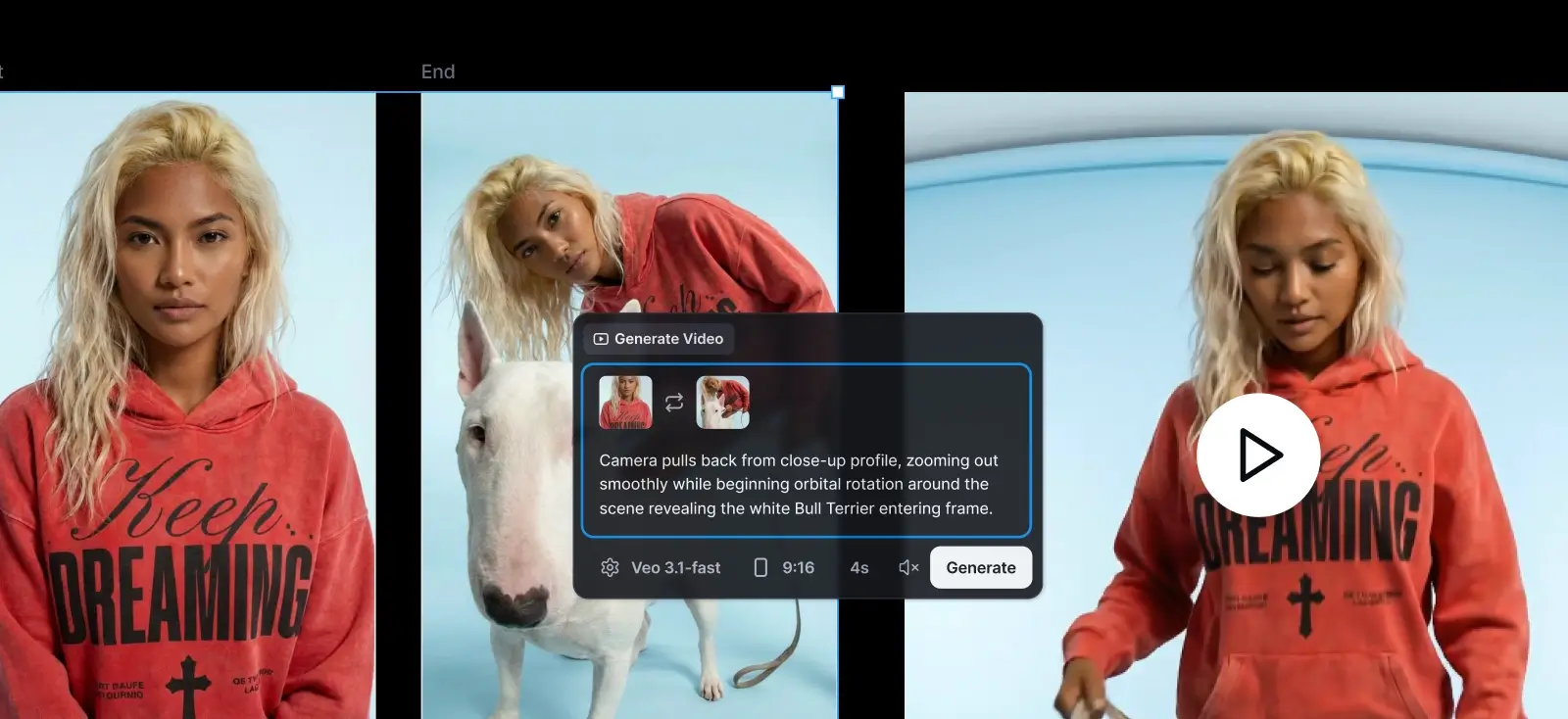
Crane shot pro tip: Define a clear start frame and end frame so the rise or drop stays controlled and finishes where you want it.
11 video AI prompt library for a mini-campaign
Not sure what to type first? Steal one of these and swap in your own subject. They are written for six-second clips with a single clear action, layout-safe constraints for text, and minimal camera movement to reduce drift.
1. Delivered package moment, one-frame story
Camera: locked-off camera, perfectly static, no zoom, no pan, no tilt
Action:
[0-2 s] — A person carrying the box enters frame
[2-3 s] — The person puts the box on top of one box
[3-6 s] — The person’s hands have completely exited the frame. The boxes remain still and neatly stacked, with no further movement or interaction
Ambience: subtle outdoor city sounds
SFX: a low dull thud as the box meets the surface, subtle cardboard compression, short friction scrape as it aligns
2. Ecommerce candle mockup, label-safe flicker
Camera: locked-off camera, perfectly static, no zoom
Action:
[0-1 s] — Hold still
[1-6 s] — Candle flame burns naturally and flickers with small irregular movement, light and shadows shift subtly
Context: keep label, typography, and layout perfectly still and readable, no warping, no drifting
Ambience: quiet indoor room tone
SFX: soft flame crackle
3. Floating jam hero, ingredients drift, with sound
Camera: locked-off camera, perfectly static, no zoom
Action:
[1-6 s] — The subject floats upright and tilts naturally in mid-air. Ingredients drift around it in slow weightless motion, evenly spaced and never blocking the label area. Soft white clouds move subtly across the background
Ambience: outdoor air, light breeze
SFX: subtle birds chirping
Audio: light acoustic guitar, soft and upbeat
4. Fashion mockup for decks, slow 360 with music
Camera: locked-off camera, perfectly static, no zoom
Action:
[0-1 s] — The model stands centered and still, facing forward
[1-6 s] — The model slowly rotates clockwise in place, completing one full 360 rotation, then returns to facing the camera
Context: keep clothing graphics and tote design locked to fabric, no warping, no melting
Audio: minimal 90s electronic instrumental, slow steady groove
5. Product premium push-in, text stays pinned
Camera: slow push-in, very subtle, constant speed, no pan, no tilt, no roll, no handheld
Action:
[0-6 s] — Product remains centered while the camera pushes in slightly for a premium feel, reflections shift softly on the surface
Context: keep all typography and logos perfectly still and readable, no drift, no deformation
Ambience: clean studio room tone
6. Poster ad, micro parallax without losing readability
Camera: parallax move, smooth sideways travel, very subtle, no zoom, no tilt, no roll
Action:
[0-6 s] — Foreground subject drifts slightly faster than the background to create depth separation
Context: keep headline and small text perfectly locked and readable, no distortion
Style: clean editorial, soft grain, calm pacing
7. Logo loop, draw-on then glow finish
Camera: locked-off camera, perfectly static
Action:
[0-4 s] — Logo draws on smoothly as if stroked by an invisible pen
[4-6 s] — Subtle glow pulse passes once, then settles
Context: keep edges crisp, no wobble, no smoke, no extra elements, seamless loop reset
SFX: soft pencil scribble
Audio: minimal airy synth pad, very low volume
8. Neon script, write-on with sign flicker
Camera: locked-off camera, perfectly static
Action:
[0-4 s] — Script text writes on stroke-by-stroke
[4-6 s] — Neon glow turns on softly, one gentle flicker, then stable
Context: keep background static, keep letterforms clean and not distorted
SFX: marker squeak or pencil scribble
Audio: subtle nighttime ambience, distant city hush
9. App UI hero, clean reveal for landing pages
Camera: locked-off camera, perfectly static, no zoom
Action:
[0-2 s] — UI card fades in and sharpens to full clarity
[2-6 s] — Soft highlight sweep across the UI once, then hold
Context: keep all text razor sharp and readable, no drifting, no morphing of UI elements
Ambience: quiet office room tone
SFX: soft whoosh on reveal
10. Skincare before-after, two-frame transformation
Camera: locked-off camera, perfectly static
Action:
[0-3 s] — Transition from start frame to end frame smoothly, like a gentle wipe reveal
[3-6 s] — Hold on the end frame with no additional movement
Context: keep packaging label readable, maintain original colors, no warping, no extra objects
SFX: soft swipe whoosh
Audio: clean modern pop pluck, low volume
11. Food close-up, appetizing steam and light movement
Camera: locked-off camera, perfectly static
Action:
[0-6 s] — Subtle steam rises naturally, tiny light shimmer on the surface, gentle shadow movement
Context: keep branding and plate placement fixed, no melting or deformation
Ambience: quiet kitchen background
SFX: soft simmer or sizzle, very subtle
Key takeaway: The video AI prompt that keeps your continuous replay
If your motion looks random, it’s missing direction.
The Kittl Video prompt approach works because it tells the model what to focus on, what’s allowed to move, and what must stay locked so your design doesn’t drift or fall apart mid-loop.
- Use a modular structure. Write your prompt in clear blocks. You can start with CAMERA, ACTION, AUDIO, TEXT. Add new blocks if needed, or if you want to be more specific, such as LIGHTING, STYLE, SOUND EFFECTS, etc.
- Describe camera motion using motion terms. In the CAMERA section, use clear language like push-in, pull-back, slow pan, subtle handheld.
- Describe the subject first, then the action. In the ACTION section, clearly state what the subject is, where it is, and then what it does.
- Focus on one main action. Too many actions at once often break motion consistency.
- Avoid over-directing. Fewer, clearer instructions usually produce smoother and cleaner motion.
- If you want more happening, sequence it with time beats like “0–2s, 2–4s, 4–6s” instead of piling actions on top of each other
Ready to make your next design move? Open Kittl, drop in a mockup or social post, and try Kittl Video with one of the prompts above. Keep it simple, keep it controlled, and ship a six-second loop you actually want to share.